Quick entity tagging, cleaner notes, and stronger story state
June 6, 2026
Type @ to tag entities while drafting, plus a round of polish to note cards, notes grouping, At This Point filters, and update thread reliability.
After shipping Timeline Events and Time Queries, we ran a full manual smoke test and found a handful of rough spots. Including: cramped note cards, filters that reset when switching tabs, note threads that occasionally showed duplicate active states in At This Point. This update fixes all of them. And while we were at it, we added a small feature that's been on the wishlist for a while: quick entity tagging via @ in the editor.
What's new
Type @ to tag an entity while writing
The fastest way to insert an entity chip into your manuscript is now to type @ while drafting. A small suggestion menu opens near the cursor, filtered as you type. Search works by entity name and alias. For example, if The Archive has the alias "Archive," typing @arc surfaces it. Entities with the same name show their type alongside so you can pick the right one.
Keyboard behavior:
- Enter or Tab inserts the highlighted entity. The
@querytext disappears; a clean chip takes its place. - Escape closes the menu and leaves whatever you typed as literal text in the manuscript.
@is a valid writing character, and Scriptri won't assume you meant to tag anything. - Arrow keys navigate the suggestion list.
- Clicking a suggestion works too.
The chip that is inserted is identical to selection-based tagging. Alias search, same-name disambiguation, JSON round-trips, and plain-text manuscript export all behave the same way.
Cleaner note editing
Note cards in the Notes tab have been reorganized. What was one cramped row of six controls is now two:
- Row 1 — checkbox-style controls: Show in At This Point, Flag
- Row 2 — text actions: Update, Promote/status, delete
The delete confirmation also stays within the card now. Previously it could overflow the card boundary, which was especially noticeable on continuity notes with many active controls.
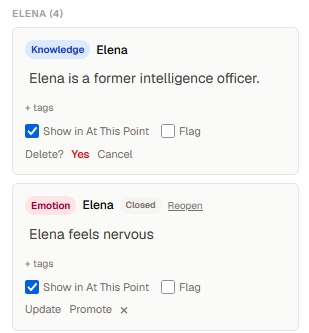
Once a note has been promoted to a Timeline Event, the Promote button is replaced by a Timeline event status badge. You can't accidentally create duplicate Timeline Events from the same note through the normal workflow. If you're importing older data that already contains duplicates, the badge shows a count rather than hiding the situation.
Notes grouped by entity
Notes in the current scene are now grouped by entity rather than appearing as a flat unsorted list. Entity groups sort A–Z by name. Notes within each group sort by type order; Knowledge, Belief, Emotion, Relationship, Continuity. Then by creation time.
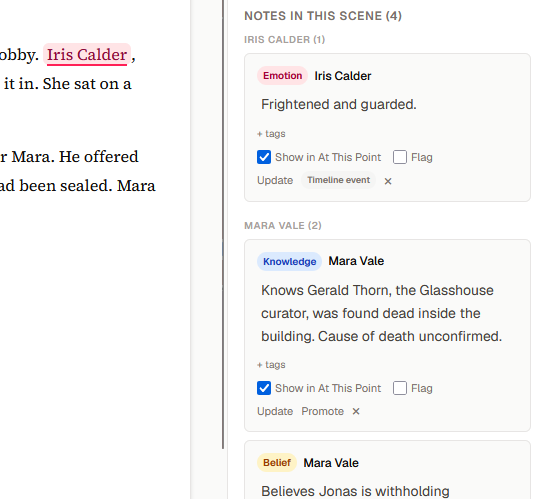
Relationship notes group under their source entity and still show the target clearly. Notes for deleted or missing entities fall into an "Other" group at the bottom. When you search in the Notes tab, empty groups hide and counts update to show only what matches.
At This Point — filters stay put after navigation
Entity and note-type filters in At This Point previously reset whenever you switched to the Notes tab and back. They now persist across tab switches within the same session.
Filters also behave correctly on scene changes: an entity filter targeting a character not present in the new scene clears automatically; a filter targeting a character who is present carries forward. Note-type filters persist across scenes. Before/After Scene mode was already persistent and remains unchanged.
More reliable update threads
When the same note is updated in multiple scenes, Scriptri now ensures those updates form a linear thread in story order — regardless of what order you actually created the updates.
Previously, updating a note in Scene 4 and then going back to Scene 2 to update the same root note could produce a shape where both updates looked like siblings of the original. At This Point would sometimes show both as separate active notes rather than presenting the latest applicable state with earlier versions accessible as history.
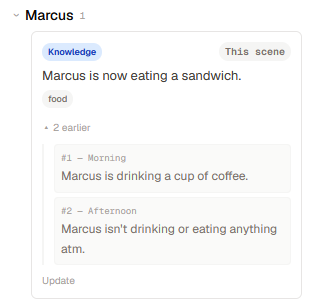
Thread normalization now runs whenever you create an update, change a scene date, reorder scenes, or delete a scene. Import and the database migration path also normalize existing threads. At query time, a defensive step prevents any legacy sibling-shaped data from producing duplicate active notes.
In practical terms: if Marcus was drinking coffee in Scene 1, switched to tea in Scene 2, and is gone by Scene 4 — At This Point shows exactly one active Marcus state based on where you are in the story, with earlier versions available as history when you expand a note's thread.
This same fix applies to After Scene display more precisely. When the current scene itself contains an update note, that update now participates in the same supersession pass as notes from prior scenes. The current scene's note correctly suppresses its predecessor without requiring you to be at a later scene to see the right result.
Why it matters
Note threads and At This Point are most useful when you can trust them. If two "active" entity notes appear with no clear reason, it could have created continuity confusion. Most of this update is about making the behavior match the expectation; the right state active and earlier states as history. Displayed in a, hopefully, intuitive way.
The @ shortcut is the visible addition we've wanted from the beginning, but the stability work is probably the more load-bearing improvement for anyone working with a complex long-form project.
Also included
- Entity pickers now sort A–Z by name, with entity type as a tiebreaker; consistent across the mention popover, tag picker, and scene context list
- Opening the Entities dialog now closes any open entity popover; previously a popover could be left floating on screen in some instances
- The Timeline Event time input normalizes partial entries. Typing
09produces09:00instead of leaving the minute field incomplete - Tests were expanded around note thread normalization, filter validation, entity search ranking, and the export/import handling of source note linkage
What's next
A few areas we're looking at:
- Location tracking — where characters and objects are, which will flesh out core static world-building tools to tie into continuitiy tracking
- Onboarding — clearer orientation for writers new to continuity tracking tools
@newnameentity creation — typing@followed by a name that doesn't exist yet and creating the entity inline (not in this release; but upcoming soon™)- Workflow education — better explanations of how update threads, thread history, and At This Point work together, for writers who aren't familiar with how Scriptri workflow works