
See the demo project
No account required. Opens instantly.
Create a new empty project
Start from scratch on this device.
Continuity tracking for fiction writers. No account required. Runs on your device.
Scriptri tracks continuity and story state
Scriptri is a tool for connecting worldbuilding, character knowledge, relationships, and other notes to the places in your manuscript where they matter.
It tracks two kinds of information: objective facts about the story world, and each character’s subjective state, including what they know, believe, misunderstand, feel, suspect, or haven’t yet discovered.
That state changes as the story progresses, so Scriptri tracks it at specific points in the narrative instead of keeping one static description.
This gives writers a place to record what a story depends on for consistency, even when it’s never stated directly in the manuscript.
Example
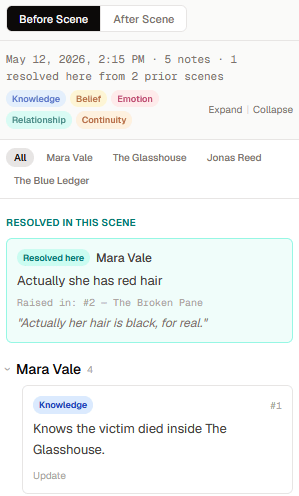
At This Point surfaces the state relevant to wherever you are in the manuscript: what a character knows, what they believe, and what’s changed by that scene.
A few things every long manuscript has to keep straight.
What a character knows
A secret revealed in Chapter 8 can't already be known in Chapter 4, and a character who wasn't there yet can't react to it.
Whether an injury has healed
An injury from Tuesday should still be present on Wednesday, unless something in the manuscript treated it.
Where an object is
A ledger that was destroyed in one scene can't turn up in someone's pocket three chapters later.
What's still unresolved
Open questions and loose threads quietly pile up until a beta reader finds all of them at once.
Scriptri tracks your story’s state at every point in the manuscript.
Instead of one static description of your world, Scriptri connects what you record to the scene where it changes. A note about what a character knows, believes, or hasn’t resolved yet is tied to a position in your story, not just a general note about them.
When you’re drafting a later scene, Scriptri can show you the story’s state at that point: what’s changed, what’s still open, and what no longer holds.
How it works
Start with scenes
Create scenes, import a manuscript, or connect a Scrivener project for read-only source review in supported browsers.
Record what matters
Tag entities and add notes about knowledge, beliefs, relationships, locations, and other changes in the story.
Check the story's state
Use At This Point and focused workspaces to check context, research questions, and review details that need attention.
What Scriptri keeps track of
At This Point
Jump to any scene and see what's changed by then: entity filters, note-type badges, and a callout when something was resolved earlier in the manuscript. Shown above, with a real example.
What changes as the story moves
Working from your manuscript
Staying organized
Local backups and export
Keep local snapshots and export your full project to JSON whenever you want an external copy.
Your manuscript stays on your device.
Scriptri is local-first. Project data is stored in your browser storage (IndexedDB), on this device, under your control. The beta is free and does not require an account.
Manuscript text, scene titles, notes, entity names, search text, and imported file names are not sent to analytics. Scriptri does not train on your manuscript and currently has no AI integration.
Export your project to JSON regularly. Local backups help recover from mistakes, but browser storage is not guaranteed to persist across updates, device wipes, or data-clearing actions. Keep a copy somewhere safe.
See Scriptri in action
At This Point brings your notes and story context to the selected scene.
Learn more about continuity tracking
Practical articles on continuity, revision, and manuscript organization for fiction writers.
Frequently asked questions
What is Scriptri?
Scriptri is a local-first workspace for fiction writers that tracks what's changed in your story. It helps you track continuity, source changes, and reference details around a manuscript: what characters know, believe, carry, reveal, and resolve at different points in the story.
Is it a writing app?
It includes a scene editor, but Scriptri is primarily a workspace that tracks what's changed in your story and helps maintain continuity. You can keep drafting in Word, Scrivener, Google Docs, or another tool and use Scriptri to review what your characters know, believe, or haven't resolved yet, at different points in your manuscript.
Is it an AI writing tool?
No. Scriptri currently has no AI integration, does not generate prose, and does not train on manuscript content. It organizes records and evidence you create; you remain the source of truth.
Is it a Scrivener replacement?
No. Scriptri works alongside Scrivener. In supported browsers it can read a connected Scrivener project, watch for changes while Scriptri is open, and ask you to review ambiguous updates. It never writes back to Scrivener.
Where is my data stored?
In your browser storage, using IndexedDB, on this device. In the current local-first beta, your project data stays on your device unless you export it yourself.
Can I export my data?
Yes. Every project can be exported to a JSON file from the project screen. You can re-import it on another device or keep it as a backup.
What happens if I clear browser data?
Your projects will be deleted. Export your data regularly and keep a copy somewhere safe. Local backups inside the app help with accidental changes, but they live in the same browser and are not a substitute for an external backup.
Does it support DOCX, Markdown, or Scrivener import?
Yes. Scriptri can import DOCX, Markdown, plain text, EPUB, and zipped Scrivener projects. In supported browsers, it can also connect to a Scrivener project folder for read-only change monitoring and a review queue. Basic Scrivener RTF formatting is preserved where supported.
Is it free?
Scriptri is free during beta. Pricing after the beta period has not been determined. Current users will be notified well in advance of any change.
Will there be cloud sync?
There is no cloud sync today and no promised release date for it. Scriptri is local-first, and the free, no-account path remains part of the product direction.
Does Scriptri read or track my manuscript?
Your project data stays on your device. Scriptri does not send manuscript text, scene titles, notes, entity names, search text, imported file names, or Scrivener content to analytics. During beta it may collect anonymous feature-use events without the content of your writing.
Scriptri is in beta.
Scriptri is in active development. Bugs are possible. Features will change. Export regularly as a precaution.
Latest update: Scriptri 0.4: Lore Pages, story-thread topics, and Word Finder (August 20, 2026)
The beta is free. Pricing after the beta period has not been decided. Any future paid version will be announced to current users well in advance. If you are using Scriptri now, you will not be surprised.
Found a bug or have an idea? Feedback form or email.
Scriptri is free during beta. If it helps your writing and you want to support development, you can support development.
Try it on a story you didn’t have to write.
Open a finished sample project and see how Scriptri tracks it, or start with your own manuscript whenever you’re ready.