Scriptri 0.4 is here. It is also considerably larger than I expected it to become.
The release began as an effort to give project lore a proper home. That work exposed related problems around entity profiles, glossary definitions, evolving continuity threads, and the way those different kinds of information connect to one another.
The result is an update centered on two kinds of story knowledge:
- Reference material that remains broadly true about the story world
- Evolving state that changes as the manuscript progresses
0.4 adds substantial tools for both, along with safer Scrivener synchronization and a new Word Finder.
Lore Pages
Projects now have a dedicated Lore workspace for longer-form reference material.
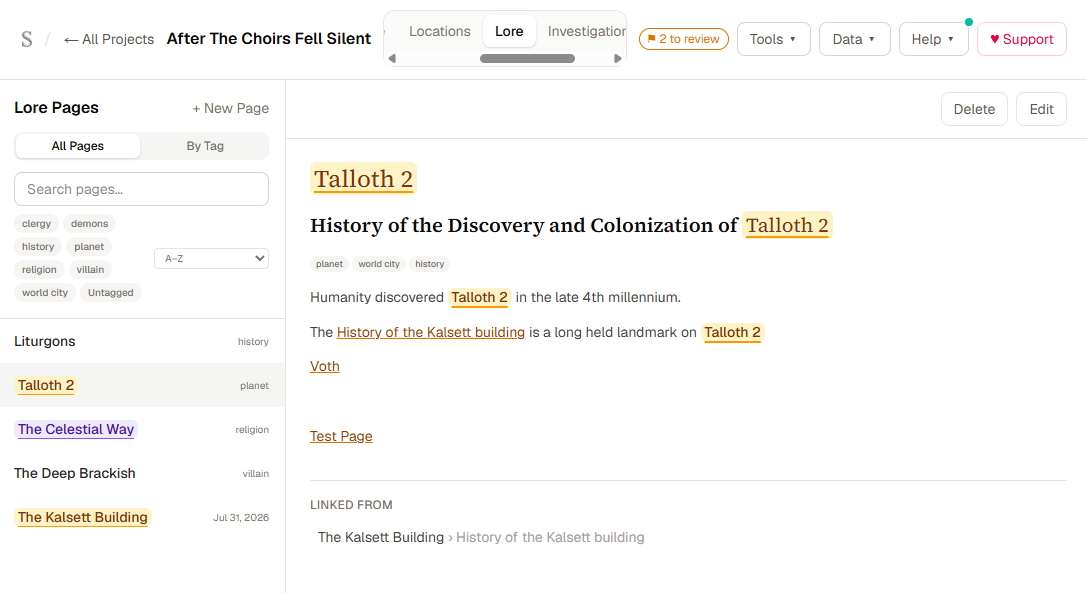
Lore Pages support headings, lists, formatting, entity mentions, inline tags, and structured links to other project records. A page can link to:
- Other Lore Pages
- Specific headings inside a Lore Page
- Entities
- Scenes
- Investigations
- Continuity flags
These are structured references rather than plain pasted names. Renaming a target does not break the link, and links to deleted or changed destinations degrade visibly instead of silently pointing somewhere else.
Lore Pages also show backlinks, making it possible to see which other pages and sections refer to the current subject.
Editing and reading are separate modes. Opening a reference takes you to a stable read view, while entering edit mode is a deliberate action. Pending edits are flushed before navigation, export, replacement, or deletion so a quick workspace change does not discard the last few seconds of writing.
You can type @ to mention an entity, [[ to create an internal link, or # to add a project-level tag from inside the Lore Page body.
Lore Pages also appear in Quick Reference search.
Richer Entity Profiles
Entity information now lives in a unified Profile workspace.
The former Full Name and Description fields have been folded into a more flexible system:
- Identity fields remain available for names, aliases, and entity type.
- Properties provide compact structured details.
- Profile provides a longer formatted document.
- References show where the entity is used across the project.
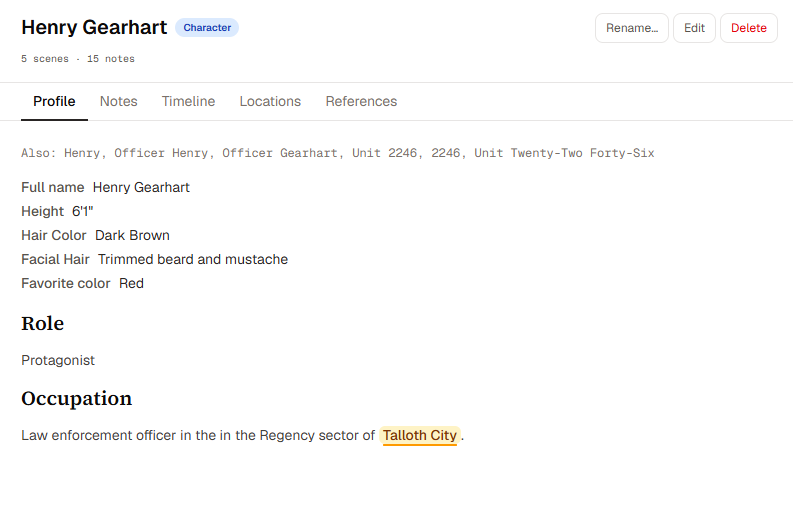
Profile documents support the same richer project-reference conventions used elsewhere, including entity mentions and internal links.
Existing entity information is preserved through the migration. Older compatibility fields remain internally for now so project exports and previously released data continue to work safely.
Expandable Glossary Definitions
Glossary entries can now contain real formatted Definitions rather than only short plain-text notes.
Definitions support:
- Multiple paragraphs
- Bulleted and numbered lists
- Emphasis and formatting
- Entity mentions
- Links to Lore Pages
Entries with longer Definitions can be expanded without turning the Glossary into a second long-form workspace. Definition text is also available to filtering and Quick Reference.
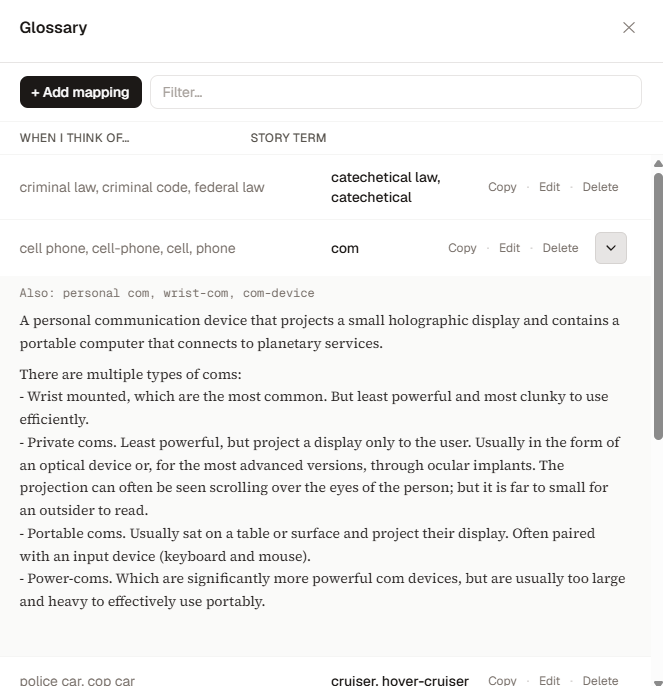
Existing Glossary content remains readable, and structured references survive project export and import.
Story-Thread Topics
At This Point has a new hierarchy for projects with many continuing threads.
A state thread can now have an optional Topic: a stable name for the subject being tracked while the actual state continues to change.
For example, a character might have separate Topics for:
- An injury
- A secret
- A relationship
- A suspicion
- A missing object
- An unresolved continuity concern
At This Point groups information by Entity, Category, and Topic. Each Topic can show its current state and history without requiring every note to remain expanded at once.
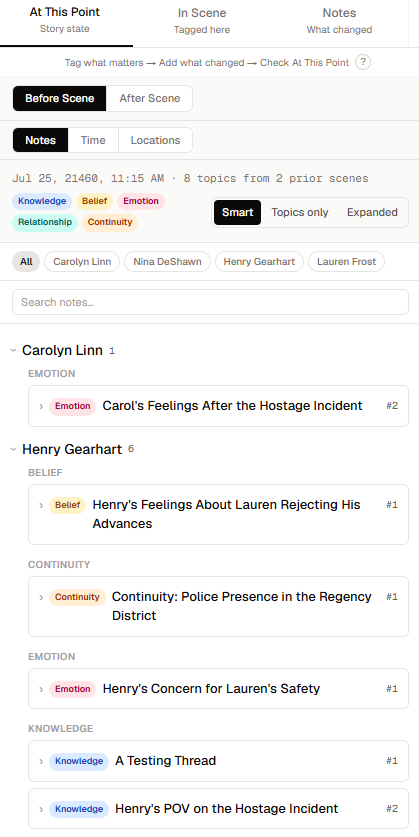
The new Smart, Topics-only, and Expanded views provide different levels of density. Search considers Topic names, current state, and thread history, and it can reveal a matching result without permanently changing the surrounding expansion state.
Topics can contain entity mentions and remain attached to the thread as it is updated, resolved, closed, or reopened.
Safer Scrivener Sync
Scrivener synchronization received another correctness pass.
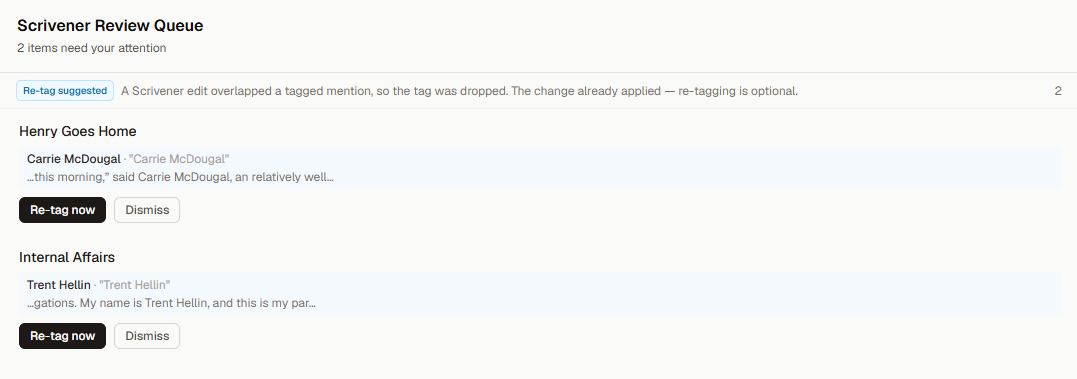
Previously, an ordinary source edit could be sent to review merely because an entity tag existed somewhere else in the same scene. Scriptri now evaluates changes relative to the protected annotations they might affect.
Edits after the final protected annotation can often be applied automatically. Changes that overlap tagged content, occur before later annotations, or compete with prose edited inside Scriptri still go to review.
Scriptri also compares the connected source when a project opens, rather than relying only on file changes observed during the current browser session. This allows it to find Scrivener edits made before Scriptri was opened.
Source Sync now includes a visible Check for changes action, and rapid filesystem notifications are coalesced to avoid duplicate scans and review items.
Additional safeguards prevent an in-progress scan from one project from updating another project after navigation.
Scrivener access remains read-only. Scriptri does not write changes back into the Scrivener project.
Word Finder
The desktop Tools menu now includes Word Finder.
Word Finder provides five search modes:
- Define
- Synonyms
- Alternatives
- Related words
- Sounds like
Definitions are grouped by full part-of-speech names, numbered for readability, and can include pronunciation and context labels when the provider returns them. Individual results can be copied directly.
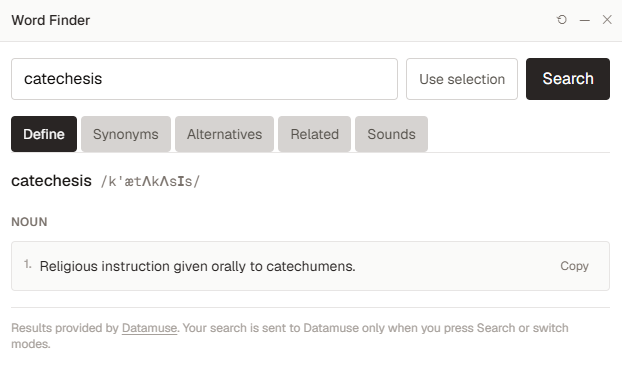
You can type a query or use text selected in the manuscript. Choosing Use selection stages that text in the query field but does not send it anywhere. The Search selection action remains separate and receives a brief visual cue so the next step is visible without adding persistent instructions.
Queries are capped at 200 characters.
Word Finder uses Datamuse, an external dictionary and thesaurus provider. When you perform a search, the query is sent through Scriptri’s server to Datamuse. Once a query has been submitted, switching to an uncached result mode may request that mode from Datamuse as well.
Opening the tool, typing, or selecting manuscript text does not send a query by itself. Word Finder results and queries are not stored in the project, and its analytics contain only categorical information such as the selected mode—not the searched text or returned words.
More Project Pulse Milestones
Project Pulse now recognizes several parts of Scriptri that previously had no milestone coverage.
New milestones include meaningful use of:
- Lore Pages
- State-thread Topics
- Time Distance Queries
- Scrivener connection and review
- The Continuity Checklist
These milestones use structural counts and local usage flags. They do not inspect or transmit the contents of the manuscript, notes, Lore Pages, or checklist answers.
What Has Not Changed
Scriptri remains local-first and free during beta.
Project data remains stored in the browser. The Word Finder query described above is the specific exception when you deliberately perform a search through the external provider.
Scriptri still does not generate prose or include an AI writing system.
Scrivener access remains read-only.
The writer remains the source of truth.
Known Limitations
A few related areas remain separate work:
- Manuscript prose cannot yet originate links to Lore Pages.
- Some large entity selectors and context views can still become crowded in very large projects.
- Word Finder is currently a desktop tool.
- Datamuse is designed primarily for words and short phrases, so long selected passages may not produce useful results.
- Some complex editor interactions still rely on manual regression testing because Scriptri does not yet have a component-level interaction test harness.
What Comes Next
0.4 establishes a clearer distinction between reference knowledge and changing story state.
Lore Pages hold the material a writer wants to consult. Entity Profiles describe important subjects. Glossary Definitions explain project terminology. Topics organize the state that keeps evolving from scene to scene.
The next work can build on those systems without forcing every kind of story information into the same shape.
For now, 0.4 gives larger projects a much stronger memory.