This is the biggest Scriptri update so far.
Scriptri started as a focused continuity editor: write scenes, tag the important people or places, add notes about what changed, and check At This Point when you needed to remember what was true in the story.
That core is still here. But 0.2 expands the shape of the app around it.
Scriptri is now much closer to what it has been trying to become: a local-first story memory workspace for fiction writers. A place to write or review scenes, track continuity, look up details, investigate questions, manage source changes, and keep project knowledge close without turning the manuscript over to an AI writing tool.
There is a lot in this update. Some of it is big and visible. Some of it is small and load-bearing. Most of it came from actually using Scriptri on a real story and finding the places where the workflow still felt too narrow, too hidden, or too awkward.
Project workspaces
Scriptri now has a real workspace structure.
Instead of treating everything as a modal attached to the editor, the app now has project-level workspaces for different kinds of story work:
- Write — draft and review scenes, tag entities, add notes, and use At This Point
- Entities — browse characters, places, objects, factions, concepts, aliases, notes, timeline links, and location history
- Timeline — manage story events and time queries
- Locations — track where scenes happen and where characters or objects are
- Source Sync — manage Scrivener sync, review incoming source changes, and resolve conflicts
- Investigations — collect evidence around a continuity question
- Audit — review unresolved or incomplete project work in one place
This is partly an interface change, but it is also an architectural one. Scriptri has outgrown being only a three-panel scene editor. The scene editor is still the heart of the app, but it is no longer the only place where project work can happen.
That matters because continuity is not one workflow.
Sometimes you are writing a scene.
Sometimes you are checking what a character knows.
Or sometimes you are trying to figure out where an object was last seen.
Next you might be reviewing open flags.
And sometimes you are asking, “Did I already establish this somewhere?”
The point is, there are different modes of work when trying to maintain continuity in your manuscript. Scriptri 0.2 builds scaffolding for those modes (and there are more to come).
Source Sync and Scrivener review
Scriptri now has a much more serious Scrivener workflow.
The important part first: Scriptri does not write back to Scrivener.
If you are a writer who writes prose in Scrivener, Scriptri is now more integrated with your Scrivener workflow. Scriptri can connect to a Scrivener project, read from it, watch for changes while Scriptri is open, and update linked scenes when it is safe to do so. If something is ambiguous or potentially conflicting, Scriptri asks you to review it instead of silently deciding for you.
The Source Sync workspace now gives Scrivener sync its own surface to show you conflicts that need to be resolved. This includes showing whitespace, highlighting additions and removals, and making small differences easier to review.
Source Sync can:
- connect a Scrivener project folder in supported browsers
- watch for changed Scrivener documents while Scriptri is open
- update linked scenes when changes are safe
- detect new, changed, missing, or review-needed source items
- keep a review queue for changes that need attention
- let you accept the Scrivener version, keep the Scriptri version, or dismiss a review item
- show when a scene has been edited in Scriptri since the last accepted Scrivener sync
The review queue has also been through several rounds of polish. It now uses a more useful diff layout, neutral panels, clearer labels, better visibility for tiny changed characters, and less “why is the entire right side green?” confusion.
This feature is intentionally conservative. If Scriptri is unsure, it will ask.
It's also the first version of integrating your existing manuscript workspace with Scriptri, laying the groundwork for deeper continuity tools in future updates without demanding you abandon your existing tools.
Basic manuscript formatting
Scriptri now supports basic manuscript formatting in the editor:
- bold
- italic
- underline
- strikethrough
- scene breaks
The formatting toolbar can be hidden, and keyboard shortcuts always work whether the toolbar is hidden or not.
This also improves Scrivener import and sync. Basic formatting from Scrivener RTF content, especially common prose formatting like italics, is now preserved in Scriptri instead of being flattened to plain text.
That is a bigger deal than it sounds. Because it's moving Scriptri in the direction of respecting and preserving the structure and meaning of manuscript text.
For example: Italicized inner thought, emphasis, quoted text, and scene breaks are manuscript meaning. Losing them during import or sync makes maintaining continuity much more difficult. 0.2 does not turn Scriptri into a full word processor, but it does make the editor/Scrivener workflow much more respectful of normal manuscript text.
The goal is to let Scriptri carry enough manuscript shape that continuity work does not feel detached from the actual prose.
Location continuity
Location tracking is now part of Scriptri.
Scenes can have locations. Characters, objects, and other entities can have location facts. Scriptri can distinguish between different kinds of spatial story information:
- where a scene happens
- where a character or object is
- where someone arrives
- where someone leaves
- where something moves from and to
- where something was last seen
- where a character believes someone or something is
That last distinction matters.
“Mara is in the Greenhouse,” “the ledger was last seen in the Greenhouse,” and “Iris believes Jonas is in the Greenhouse” are not the same continuity fact. Scriptri now has a place to record those differences.
There is also a small scene-location control in the Write workspace, so setting a scene’s primary location does not require opening the full Locations workspace and filling out a long form every time.
The Locations workspace is there for heavier review, filtering, and editing. The scene header is there for the common case: “this scene happens here.”
At This Point now has more to work with
At This Point is still one of Scriptri’s core ideas.
The question is:
At this point in the story, what is true?
Earlier versions focused mostly on entity notes: what someone knows, believes, feels, wants, has, or is connected to.
0.2 broadens that context.
At This Point can now draw from more structured project memory, including time and location information. That means Scriptri can do a better job answering questions like:
- What notes are active here?
- What has changed before this scene?
- What timeline events matter near this point?
- Where is this entity now?
- Where was this object last seen?
- What does this character believe about someone’s location?
This is still manual. Scriptri is not deciding your canon for you. The writer remains the source of truth.
Investigations
Scriptri now has a first version of an Investigations workspace.
Investigations are for the moment when you hit a continuity question after the fact and need to scan through your manuscript and notes to find possible answers to your question.
Not every important detail is obvious when you draft it. Sometimes you are hundreds of pages in and suddenly ask:
- When did this object first appear?
- Did this character already know that?
- Where was the ledger last seen?
- Which scene established this relationship?
- Did I mention this place before the reveal?
- What exact phrase did I use earlier?
Investigations give you a place to start with a question, search project material, collect evidence, and preserve the relevant excerpts.
It is not AI analysis, semantic search, or automatic contradiction detection. It is a manual research workspace for pulling together the evidence you want to preserve.
The search/evidence model is structured in a way so that evidence can be a specific matched passage inside a scene, note, timeline event, or location fact.
Search results can show snippets of text, multiple hits from the same source, and the context that made the result worth attaching. And then later you can revisit investigations and review, add, edit, or delete relevant information.
Audit review
Audit is a project-level review surface; for seeing what already needs attention.
The audit workspace can surface existing review work such as:
- open continuity flags
- pending Scrivener/source sync review items
- scenes missing location data once the project has started using scene locations
- unanchored or incomplete structured records where the app can safely identify them
The goal of this workspace is to provide a centralized place to see what aspects of the project need attention without dictating how to address them.
Most Audit items link back to the workspace that owns the data.
Quick Reference
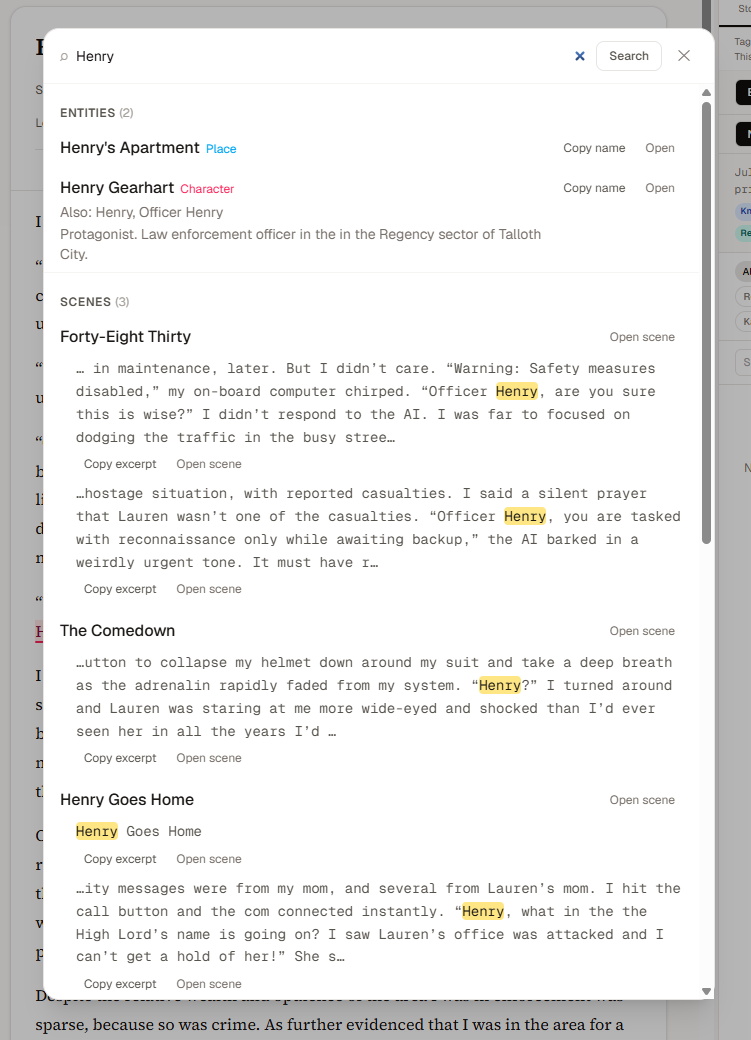
Scriptri now has a Quick Reference palette.
This is for the very common writing problem:
I know I wrote this down somewhere, but I just need the name, spelling, phrase, or fact right now.
Quick Reference opens over the current workspace, searches existing project data, and lets you inspect or copy details without changing where you are.
It can search:
- entities
- aliases
- entity descriptions
- notes
- scene titles
- scene text snippets
- timeline events
- location facts
- glossary mappings
The palette is intentionally not a command center. It is not Investigations. It does not attach evidence or create new records. It is a temporary lookup tool.
The default action is lookup. Open it, find the detail, copy what you need, and get back to the scene.
You can access the Reference Palette at any time using either the 🔍 icon in the top menu. Or by pressing Ctrl+Shift+K (Windows) or Cmd+Shift+K (Mac).
Glossary
Scriptri now includes a lightweight project glossary.
This is not meant to be an encyclopedia or a worldbuilding wiki. It is a quick reference mapping between the words you remember and the story-specific terms you want to use. It is a quick reference mapping between the words your brain remembers and the story-specific term your manuscript should use.
For example:
- TV, television, screen → viewscreen
- phone, cellphone, mobile → personal com
- elevator, lift → grav-lev
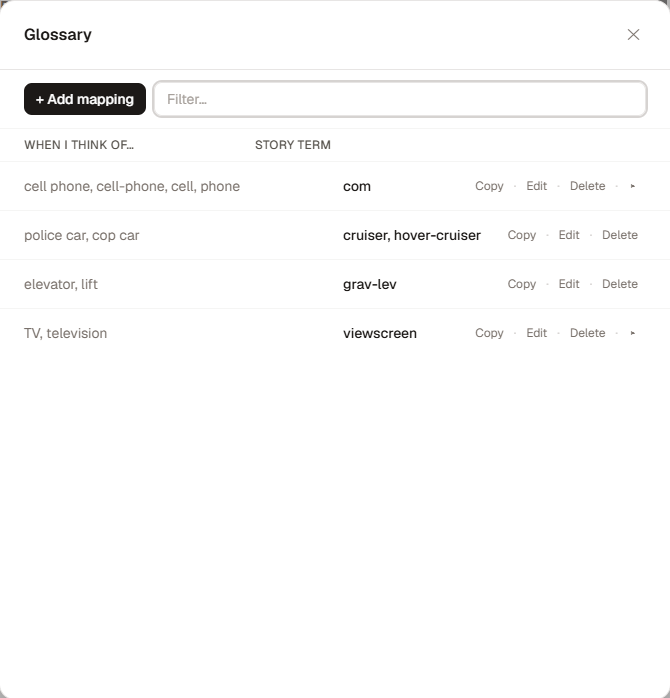
The glossary stores:
- remembered/common search terms
- a preferred story term
- optional variants
- an optional note
Glossary results also appear in Quick Reference, so you can search for the mundane word and copy the story term without leaving your flow.

This is especially useful for sci-fi, fantasy, alternate history, long series, and any project where the correct word that should be used in your manuscript is not always the first word your brain offers. And it gives you a space to record and recall those story-specific terms consistently.
You can access the Glossary interface at any time under Data > Glossary or by pressing the shortcut Ctrl+Alt+' (Windows) or Cmd+Option+' (Mac).
Alias-aware tagging
The @ tagging workflow now understands aliases more naturally.
Earlier versions could search aliases, but tagging still leaned too much toward the canonical entity name. 0.2 treats tag suggestions more like mention candidates.
If an entity is named “Mara Vale” and has aliases like “Mara,” “Detective Vale,” and “Vale,” the @ menu can offer those as separate insertable choices. The chip still points to the same entity, but the visible manuscript text can be the alias you selected.
That means you can tag the actual words you want in the prose:
- Mara
- Detective Vale
- Vale
- Mara Vale
All linked to the same entity.
Authors tag mentions, not database records. This makes the tagging workflow feel much closer to how fiction is actually written.
Project Pulse
0.2 adds the first version of Project Pulse.
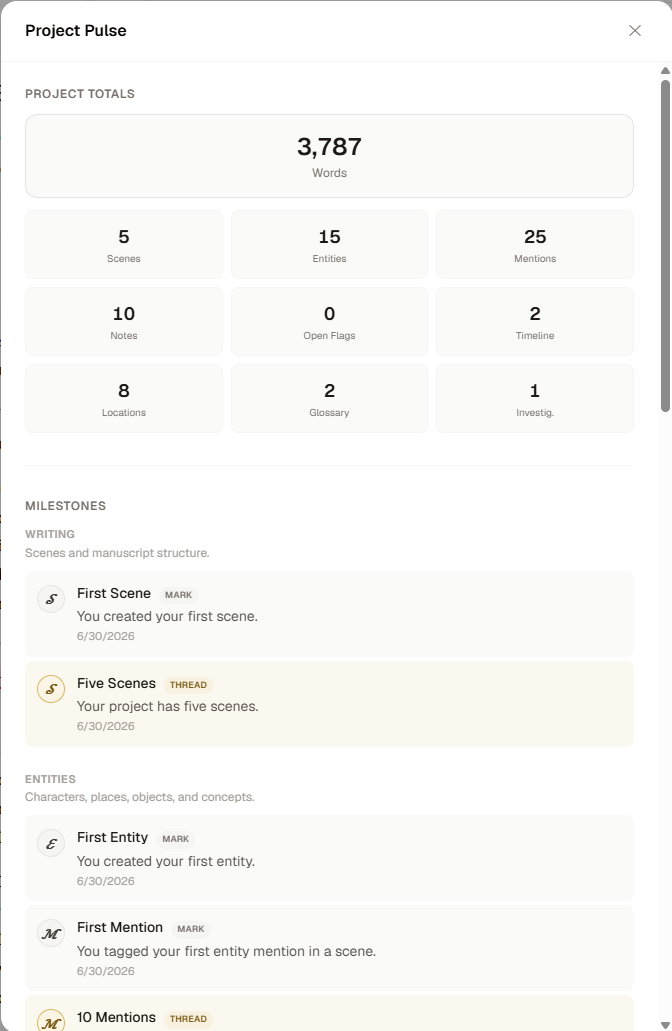
Project Pulse is a small project summary and milestone surface. It shows some of what you have built in Scriptri: scenes, words, entities, notes, mentions, locations, glossary mappings, flags, investigations, and other project activity.
It also includes milestones for discovering core workflows and features within Scriptri in a fun and intuitive way.
Examples:
- first scene
- first entity
- first mention
- first state note
- first timeline event
- first scene location
- first glossary mapping
- first investigation
Project Pulse exists to make invisible project work more visible and to help new users discover what Scriptri can do. It should feel like a small candle on the desk. Something fun to look at from time-to-time.
Milestone notifications can be dismissed, and the feature is designed to be positive or neutral. The feature is also fully optional and can be toggled off in Data > Project Pulse.
Navigation, shortcuts, and interface polish
The project header has been reorganized around the new workspace model.
The center navigation now behaves more like a workspace tab rail instead of a single dropdown doing too many jobs. Workspaces are where you go to work. Reference dialogs and project utilities live elsewhere.
The Data menu has also been reorganized into clearer groups:
- Project Data
- Imports
- Syncing
- Exports
Quick Reference, Glossary, and the keyboard shortcuts dialog now have project-level shortcuts designed to work while your cursor is still inside the editor.
There has also been a broader readability pass. Scriptri had accumulated too much ultra-light text in places where the user actually needed to read the content. Resolved notes, metadata, snippets, labels, and helper text should now be easier to see without abandoning the softer visual style.
This is not the flashiest part of the update, but it matters. A continuity tool should not make important information look disabled or nearly invisible.
Story time fixes
Scriptri now treats story dates and times more like story data and less like real-world browser dates.
That matters for projects set far in the past, far in the future, or in fictional timelines that still use Gregorian-like dates.
A scene date like:
21460-07-25T11:15
should display as:
Jul 25, 21460, 11:15 AM
When shown in the interface.
0.2 includes fixes around far-future date entry, story datetime formatting, and time-distance queries so story dates behave more consistently across the scene editor, scene list, timeline tools, and At This Point displays.
The practical effect of this means that the calendar date selection and time picker have been removed in favor of raw date/time entry, for now.
This is still not a custom calendar system (yet). But fully custom calendar and timescale systems are on the planning board for the future.
The major win with this change is: It should no longer punish a sci-fi project for having a five-digit year.
What has not changed
A lot has changed in this release, so it is worth being clear about what has not.
Scriptri is still free during beta, and the no-account/local-first path is still part of the product direction.
Scriptri still has no AI integration.
Scriptri still does not send manuscript text, scene titles, notes, entity names, search text, or imported file names to analytics.
Scrivener sync is still read-only against Scrivener. Scriptri can read and review source changes, but it does not write back into your Scrivener project.
The design philosophy is still manual control. Scriptri can help you organize, surface, and review story memory, but the writer remains the source of truth.
Known limitations
0.2 is a major foundation update, not the final version of these workflows.
A few areas are intentionally still conservative or early:
- Scrivener live sync depends on browser folder access support. This means Firefox and Safari are not supported, for this feature, at this time.
- Source Sync is careful by default and may ask for review instead of auto-applying changes.
- Diffs are improving, but they are still focused on making source changes understandable rather than recreating a full code-editor diff tool.
- Basic formatting is supported, but Scriptri is not a full manuscript formatting system.
- Investigations are manual and deterministic. There is no AI search, summarization, or automatic canon decision-making.
- Audit is a review surface over existing project data, not a general task manager or contradiction engine.
- Location tracking is V1 and intentionally avoids maps, route planning, hierarchy, automatic inference, or direct integration with timelines.
That is all by design for now.
The goal is to make the workflows useful, safe, and understandable before making them clever.
What comes next
After this release, the plan is to slow down on large feature work for a bit and focus on smaller fixes, testing, and feedback.
Scriptri 0.2 has a lot of new surface area. I expect to find rough edges as I keep using it on real writing projects.
The next phase is likely to be:
- faster bug-fix updates
- clearer docs and examples
- more outreach to writers and editors
- continued Scrivener sync polish
- better screenshots and demo material
- feedback-driven fixes before the next major feature push
The long-term direction is still the same:
Scriptri should help writers track what is true, known, believed, felt, revealed, unresolved, changed, located, or contradicted at specific points in a story.
0.2 is a big step toward that.