CustomizationEntity RenamingSync
Custom Colors, Entity Renaming, and Sync Refinements
July 27, 2026
Scriptri now supports custom colors, entity renaming, and has refined its sync functionality.
July 27, 2026
Scriptri now supports custom colors, entity renaming, and has refined its sync functionality.
Scriptri 0.3 is here! And it got much larger than I expected.
It began with a feature allowing custom entity colors and icons, and some improvements to the automatic refresh feature with Scrivener. But based on feedback, I decided to add entity renaming. And that feature exposed a harder problem: an entity can appear in manuscript text, state notes, descriptions, labels, investigations, glossary notes, and synced source material. Which meant, renaming it safely meant touching those areas of Scriptri to properly update references.
The result is an update centered on entity identity. Entities are easier to recognize, safer to rename, and usable in more parts of a project.
Scrivener sync is also much better at preserving entity tags through source changes. Along the way, Scriptri gained a continuity checklist tool, a reusable floating-tool window, revised Articles, and several smaller corrections.
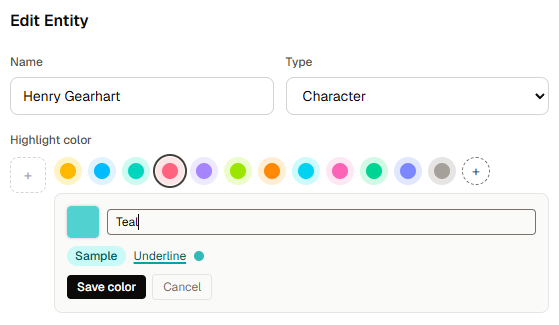
Entities are no longer limited to Scriptri's built-in color palette.
You can now create custom entity colors using a standard color picker. Scriptri uses the selected color to derive the lighter background, darker text, underline, and marker colors needed throughout the interface.
Custom colors can also be named and reused across a project.
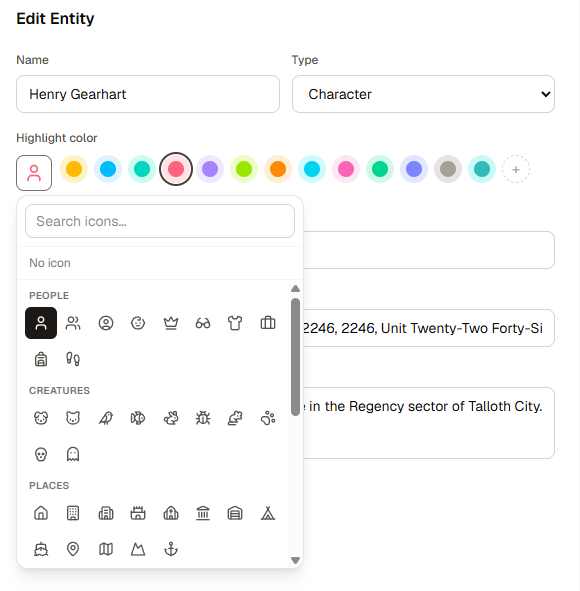
Entities can now have optional icons as well.
The icon picker includes a searchable collection organized into categories such as:
When an icon is selected, it replaces the small color dot in entity lists, chips, and entity suggestions. The icon still uses the entity's selected color, while manuscript mentions remain compact text chips.
Custom colors and icons are stored with the project and preserved through project exports, imports, and local backups.
Entities can now be renamed without losing the references already connected to them.
The new rename workflow starts with the entity's current name, full name, aliases, and the actual labels used in tagged text. You can decide which forms should change and whether an old name should remain as an alias.
Before applying anything, Scriptri shows a preview of:
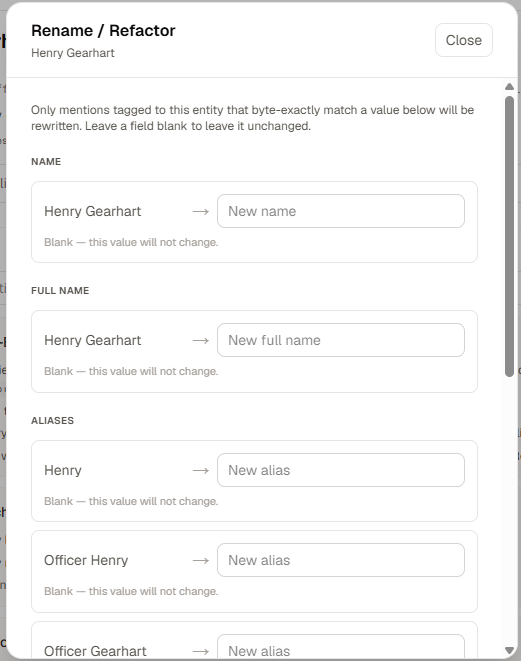
The rename happens as one project operation. The entity keeps its existing identity, relationships, notes, timeline information, and other associated data.
Scriptri still does not write changes back into Scrivener.
When a rename affects a scene linked to Scrivener, Scriptri updates the entity and any locally owned project material, but leaves the linked manuscript text alone. It then creates a rename-audit task showing what still needs to be changed in Scrivener.
As you update the manuscript and sync it again, Scriptri tracks the remaining old labels and the new labels it can find. The task can be completed once the source changes are finished, or dismissed if you no longer need it.
This keeps the rename even for Scrivener where the source text is not directly modified by Scriptri, while still giving you a clear path to finish the rename in the source manuscript.
Entity tagging is no longer limited to scene prose and a few note fields.
Many text fields throughout Scriptri now understand entity references. Type @ to search for an entity, insert a reference, and display it as a clickable entity chip.
Entity-aware fields now include:
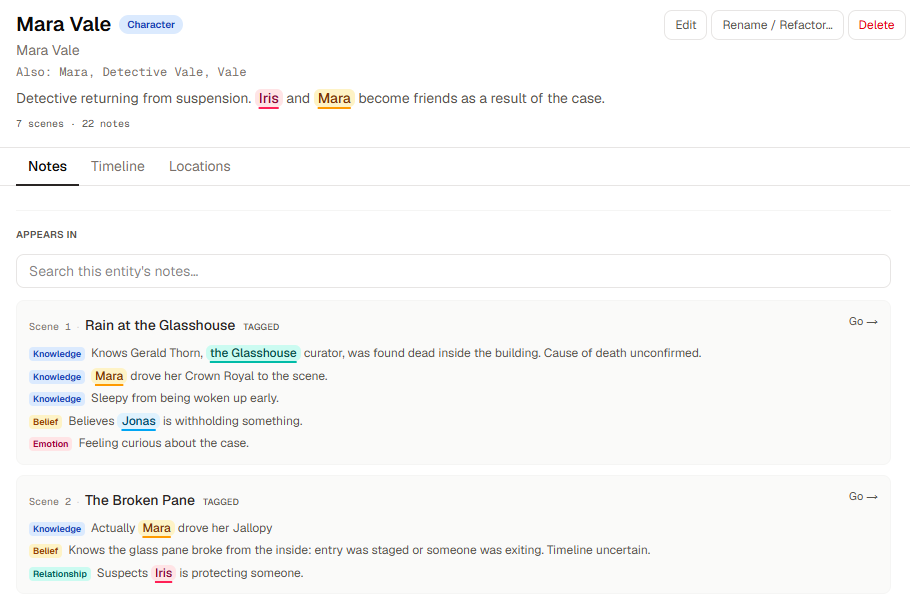
These references are connected to the entity rather than being decorative text. That means Scriptri can preserve them through editing, open the referenced entity from the chip, and update them during an entity rename.
The underlying plain text is still retained for search, display, and compatibility. Older projects continue to work, and existing plain-text fields are upgraded as they are edited.
Scene titles are not entity-aware yet. Titles in source-linked projects introduce additional questions about ownership and source reconciliation, so that work remains separate.
Scrivener sync received a substantial internal overhaul in 0.3.
The main problem was that Scriptri's entity tags and Scrivener's plain manuscript text represented the same prose differently. Tagging a name inside Scriptri could make an otherwise unchanged scene appear locally edited. Later Scrivener changes could then be sent to review unnecessarily, or replacing the scene could remove tags that were unrelated to the change.
Scriptri now compares both sides using one consistent plain-text representation.
Adding, changing, or removing an entity tag no longer makes a synced scene appear edited in Scriptri.
Formatting and actual prose changes are tracked separately from entity annotations. This makes the “Edited in Scriptri” state much more specific to changes that could genuinely conflict with Scrivener.
When a Scrivener change does not alter the words inside an entity tag, Scriptri can apply the source change and preserve the tag.
This works for more than appending text to the end of a scene. Tags can now survive many edits made before, after, or between existing tagged phrases.
If a Scrivener change directly edits or deletes a tagged phrase, Scriptri drops only the affected tag. Other tags in the scene remain in place.
When Scriptri can find a likely replacement for the dropped mention, it offers a non-blocking re-tag suggestion. Suggestions are rechecked against the current scene so completed or obsolete suggestions do not linger in the review queue.
True edits on both sides still go to review. Scriptri does not automatically merge two competing versions of manuscript prose.
The review interface can now use the last accepted Scrivener text as a baseline and distinguish between:
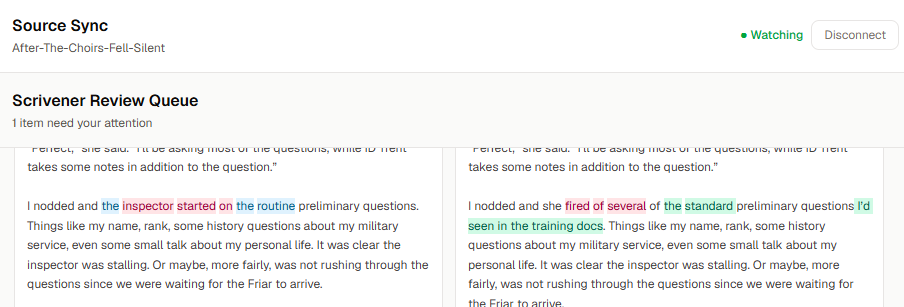
This is a review aid, not an automatic merge system. The writer still decides which version to keep.
Formatting-only conflicts also receive clearer explanations, rather than appearing as though no difference was found.
Several smaller sync issues were corrected as part of this work, including exact tag-selection behavior, scene-break position mapping, stale sync baselines, and a Firefox parsing failure caused by an invisible boundary character.
The project header now has a Tools menu.
It currently contains:
Quick Reference still works as before, including its keyboard shortcut. Moving it into Tools gives Scriptri a clearer place for temporary utilities that help with the current project without becoming full workspaces.
0.3 also introduces a reusable floating-tool window on desktop. It can be moved, resized, minimized, restored, and kept open while switching between project workspaces.
The Continuity Checklist is the first tool to use this framework.
Scriptri now includes an interactive revision continuity checklist built from the existing Revision Continuity Checklist article.
The checklist contains 51 questions across five areas:
You can work through the complete review or select a focused pass.
Each question can be marked:
Progress is saved in the browser. The Needs Attention summary collects the questions you marked and can take you directly back to an item.
The checklist can also be printed with its current statuses, progress, and Needs Attention results.
The standalone checklist is available at:
It works in the browser with no account required. This makes it usable even if you are revising a manuscript outside Scriptri.
Inside a project, open Tools → Continuity Checklist.
On desktop, it opens in the floating-tool window so it can remain beside the manuscript while you work. On smaller screens, it opens as a full-screen checklist.
The standalone and project checklists keep separate progress. Project checklist state is also separate for each project.
Checklist progress remains browser-local. It is not included in project exports or synchronized between devices.
The old Continuity articles section is now simply called Articles.
The existing /continuity addresses remain unchanged, but the section now has a shared article layout, clearer authorship, improved navigation, and more consistent related-article links.
Most of the existing articles were also substantially rewritten, including articles about:
There is also a new article:
How to Rename a Character Without Breaking Your Manuscript
A new About Scriptri page explains who I am, why I am building the app, and the principles behind it.
The Revision Continuity Checklist article and interactive tool now use the same underlying checklist definition. The article provides the explanation and revision guidance, while the tool provides a place to actually work through it.
Time Queries already supported a dynamic reference to the scene where a query is displayed, but that option was hidden when creating a query from the global Timeline workspace.
The reference picker now always offers At This Point.
For example, you can create:
The same query will calculate Mara's age using the date of whichever scene is currently displaying it. It is not permanently tied to the scene that happened to be open when the query was created.
The dynamic reference can be used in either direction, remains intact through editing and export/import, and continues to show the existing missing-time message in undated scenes.
Searches for “At This Point,” “now,” or the older “current scene” wording all find the option.
Scriptri remains local-first and free during beta.
The no-account path remains part of the product direction.
Scriptri still has no AI integration and does not generate prose.
Scriptri still does not send manuscript text, scene titles, entity names, notes, checklist answers, or other project content to analytics.
Scrivener access remains read-only. Scriptri can read source changes, preserve compatible local annotations, and help review conflicts, but it does not write into the Scrivener project.
The writer remains the source of truth.
0.3 makes entity references much more consistent, but several related problems remain:
These are separate design problems rather than unfinished parts of the rename or tagging workflow.
0.3 closes several low-level problems that I did not want Scriptri to keep building around.
Entities can now carry a stable identity through far more of the project. Renaming one no longer means manually hunting through every Scriptri field. Scrivener changes are less likely to disturb unrelated tags. And the new floating-tool framework gives Scriptri a useful place for focused utilities that should stay close to the manuscript.
The next work will likely focus on smaller fixes, feedback, and making projects with large numbers of entities easier to navigate.
For now, 0.3 makes the story memory already inside Scriptri much safer to change.